
Most small businesses do not need three automation platforms. They need one tool that moves a lead, invoice, or form submission from the app where it starts to the app where work happens. Make, Zapier, and n8n all do that job. They charge for it differently, and they ask a different amount of you on day one. Prices and published limits were checked on official vendor pages. Prices checked November 18, 2026 (USD). Where a figure was not clearly posted in text we could verify, we say so.
Quick verdict
Start with Zapier if you want the easiest setup and the widest app list. Start with Make if you want a visual builder and a lower official entry price for paid, multi-step workflows. Choose n8n if you want to pay per workflow run, or if you may self-host later.
None of the three is “best” in the abstract. Zapier officially advertises 9,000+ apps and a Professional plan at $29.99/month billed monthly, or $19.99/month billed annually for 750 tasks, after a 14-day trial with no credit card. Make’s official page lists Core at $16/month billed monthly, or $12/month billed annually for 10,000 credits (annual billing is labeled “Save 25%”). n8n’s official Cloud Starter plan is $24/month billed monthly, or $20/month billed annually for 2,500 executions, with a free self-hosted Community Edition on GitHub.
Try Make free
See Zapier
See n8n
The Make button is an affiliate link. Zapier and n8n open their official sites.
Who it’s for
Use this if you can name two or three jobs and can finish the sentence “When X happens in this app, I want Y to happen in that app.”
How the three platforms differ
Zapier: the fastest way to connect two apps
You pick a trigger, pick an action, and often have a working Zap in minutes. Official pricing describes a catalog of 9,000+ apps, the largest of the three. Free includes 100 tasks per month, but official plan copy limits it to two-step workflows for one user. Multi-step Zaps, premium apps, and webhooks start on Professional. A task is generally a successful step; Filters, Paths, and Formatter do not count toward the task limit on paid plans, according to Zapier’s pricing blog. Official help says that as of June 15, 2026, AI by Zapier steps are priced by model tier (Standard 1x, Advanced 3x, Premium 5x).
Make: the visual canvas for branching work
Make (see our Make.com review) puts every workflow on a canvas. Official help bills most module actions in credits — usually one per operation, with some AI features using more. Free includes 1,000 credits but official comparison data caps it at two active scenarios and a 15-minute minimum schedule. Paid Core lifts both limits. Make officially lists 3,500+ apps.
n8n: pay for the run, or host it yourself
Official n8n pricing is based on monthly workflow executions, “regardless of complexity,” so a 3-step run and a 30-step run each count as one execution. That can be cheaper than paying per step if a workflow does a lot of work in one run; a tiny notification still costs an execution. Official Cloud plans include unlimited users and workflows, and a Community Edition can be self-hosted from GitHub. Official Cloud trials do not require a credit card; the Business-plan trial does.
Pricing compared (November 2026)
Starting prices from official pages. Prices checked November 18, 2026 (USD). Each vendor also sells higher usage tiers, and annual billing is cheaper than monthly where both options exist.
| Zapier | Make | n8n Cloud | |
|---|---|---|---|
| Free or trial | $0; 100 tasks/month; two-step Zaps; 14-day Professional trial, no credit card. | $0; 1,000 credits/month; 2 active scenarios; no credit card or time limit (Make’s August 2026 blog). | Cloud trial: 1,000 executions, no credit card. Community Edition is free to self-host. |
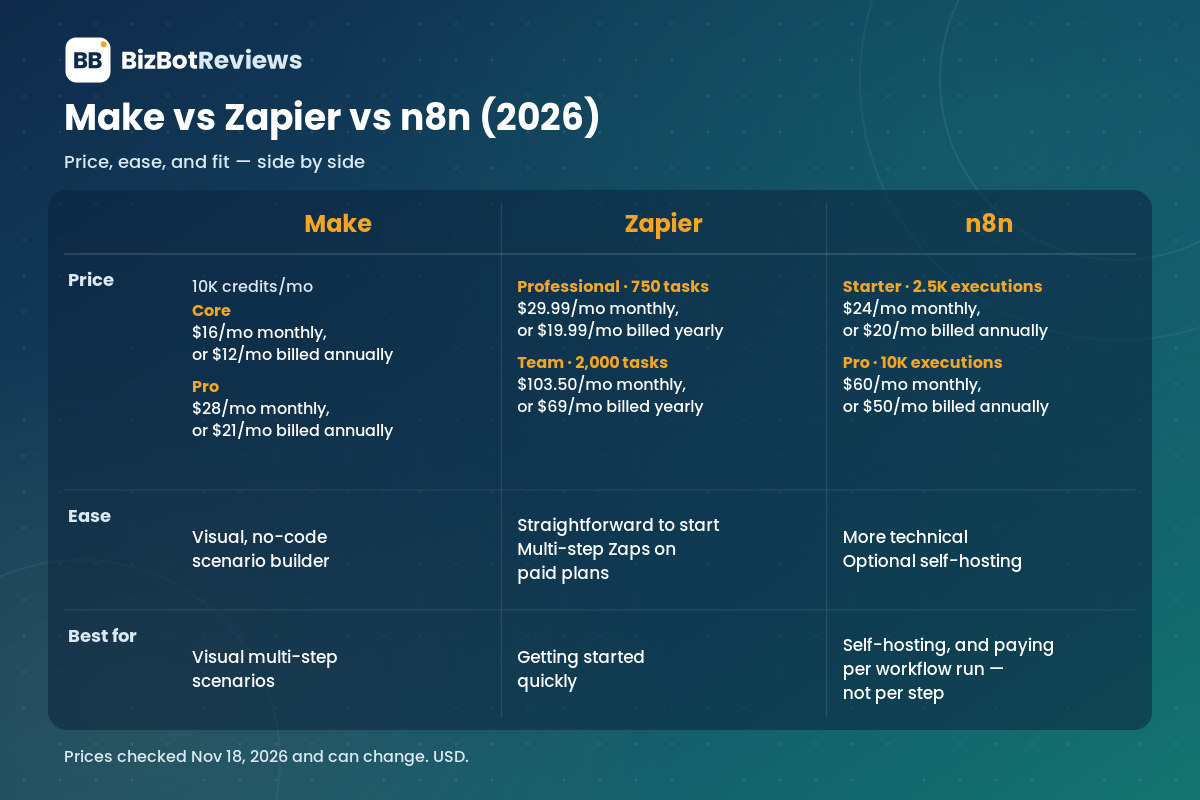
| First paid plan | Professional $29.99/month billed monthly, or $19.99/month billed annually for 750 tasks, with multi-step Zaps and premium apps. | Core $16/month billed monthly, or $12/month billed annually at 10,000 credits (annual billing is labeled “Save 25%”). | Starter $24/month billed monthly, or $20/month billed annually for 2,500 executions. |
| Next paid step | Team $103.50/month billed monthly, or $69/month billed annually for 2,000 tasks; up to 25 users; shared Zaps; SAML SSO. | Pro $28/month billed monthly, or $21/month billed annually, and Teams $51/month billed monthly, or $38/month billed annually, at the same 10,000-credit tier. | Pro $60/month billed monthly, or $50/month billed annually for 10,000 executions. We did not re-verify a USD price for Business; confirm that plan on n8n’s pricing page. |
| What you pay for | Tasks (successful steps), plus separate add-ons such as Agents and Chatbots. | Credits (usually 1 per module action; AI can use more). | Workflow executions (one run = one execution, any length). |
Two figures we still could not verify cleanly, so we are not publishing a guess: Make prices above the 10,000-credit tier (confirm on Make’s pricing page), and n8n’s higher Cloud Pro-2 size and Business plan in USD. Official help describes Pro-2 at 50,000 executions; the official cards we checked listed Pro at $50/month billed annually, or $60/month billed monthly, for 10,000 executions. Confirm current rates on n8n’s pricing page. Official help says extra Pro-2 monthly executions cost 2€, $2, or £2 per 1,000, plus tax, depending on plan currency.
Key features, side by side
All three can connect a form to a spreadsheet, post a Slack alert, or call an AI model as a step. The differences that change the decision are narrower:
- Ease of first build. Zapier wins. Make is close behind if you like diagrams. n8n asks more of you.
- Branching logic. Make’s canvas and routers are the most natural fit. n8n can go further for a technical builder. Zapier can branch (Paths start on Professional) but feels more linear.
- App coverage. Zapier, then Make, then n8n (or an HTTP request). If your exact app is missing, pricing theory does not matter.
- Collaboration. Zapier Team officially includes up to 25 users and shared Zaps. Make adds teams and shared templates on Teams. n8n includes unlimited users on Cloud, with shared-project limits (1 on Starter, 3 on Pro).
- Data control. Only n8n offers a serious self-hosted path. Official n8n pricing says hosted Cloud data is stored in the EU, on servers in Frankfurt.
Pros and cons
Zapier
Pros: Fastest setup, largest officially advertised app catalog, a 14-day Professional trial with no credit card, and filters/paths that do not burn tasks on paid plans.
Cons: 100 free tasks is a short runway; the $19.99 annual starting plan (or $29.99 billed monthly) includes only 750 tasks; costs can rise quickly at volume.
Make
Pros: Visual scenarios, a usable 1,000-credit free plan with routers, and a low official Core price of $12/month at 10,000 credits when billed annually ($16/month billed monthly).
Cons: Free allows only two active scenarios and 15-minute scheduling; credit math, especially for AI, takes some care; smaller app catalog than Zapier.
n8n
Pros: Execution-based pricing, unlimited users and workflows, a free self-hosted Community Edition, and strong options for technical teams.
Cons: Steeper learning curve; a short workflow still spends an execution; self-hosting shifts upkeep onto you.
Which one should your small business use?
- If a non-technical owner has to build the first workflow this week, use Zapier. The 14-day Professional trial is the lowest-friction way to test whether automation will stick.
- If the flow is branching, or you care about paying less per unit of work after a trial, use Make. Official Core at $12/month billed annually, or $16/month billed monthly, for 10,000 credits is still a lower entry price than Zapier Professional or n8n Cloud Starter, provided the apps you need are there.
- If someone on the team is comfortable with APIs, or you want the option to self-host, use n8n. Start with the Cloud trial unless you are ready to own updates, backups, and uptime on the Community Edition.
- If your must-have app is only listed on one platform, that platform wins. Check the app directories first.
You do not need all three. If you later outgrow Zapier’s task bill, you can rebuild the jobs in Make or n8n, but budget time for the rebuild.
Alternatives if none of these fit
- Microsoft Power Automate if you already standardize on Microsoft 365. Make’s August 2026 blog listed Premium from $15 per user per month, paid yearly; confirm the current figure on Microsoft’s site.
- Built-in CRM or email automation for simple “when a deal moves, send this email” jobs — or no tool yet, if you cannot name the weekly job to automate.
FAQ
Which is cheapest for a small business?
It depends on how you run workflows. Make’s official Core price ($12 per month billed annually, or $16 per month billed monthly, for 10,000 credits) is still the lowest published entry paid price of the three in U.S. dollars. Zapier Professional is $19.99 per month billed annually, or $29.99 per month billed monthly, for 750 tasks. n8n Cloud Starter is $20 per month billed annually, or $24 per month billed monthly, for 2,500 executions, which can still be the better value if each run does a lot of work. Estimate your monthly runs before you decide from the sticker price.
Is n8n only for developers?
No, but it is the most technical of the three. Official Cloud plans are hosted, so you do not have to run a server to try it. It is a better match for someone willing to inspect JSON than for someone who wants only point-and-click.
What happens if I outgrow my plan?
Each vendor lets you buy a higher usage or feature plan. Zapier can switch you to pay-per-task billing when you hit a task limit unless you turn that off. Make says scenarios pause when you run out of credits until you add more. n8n official help says overages depend on the plan: Pro-2 monthly can add executions, while lower Cloud plans generally upgrade instead.
Final verdict
Zapier is the safest first purchase if you value speed and app coverage. Make is the better long-term fit for many owners who want visual, branching workflows and more automation per dollar at modest volume. n8n is the right call when execution-based pricing or self-hosting is a requirement and someone technical can own the tool. If you lean toward Make, start here:
If Zapier or n8n is the better match, use zapier.com and n8n.io. See also: Make.com Review (2026).
The Make link is an affiliate link. You pay the same price; we may earn a commission.
Sources
Prices checked November 18, 2026 (USD):
- Zapier: pricing, pricing blog (June 2026 update), AI step pricing
- Make: pricing, credits help, August 4, 2026 blog
- n8n: pricing, execution limits (August 27, 2026)
Disclosure: BizBotReviews may earn a commission if you sign up through links on this page, at no extra cost to you. See our Affiliate Disclosure. Make links are affiliate links. Zapier and n8n links go to their official sites; we are not a Zapier or n8n affiliate.


Leave a Reply